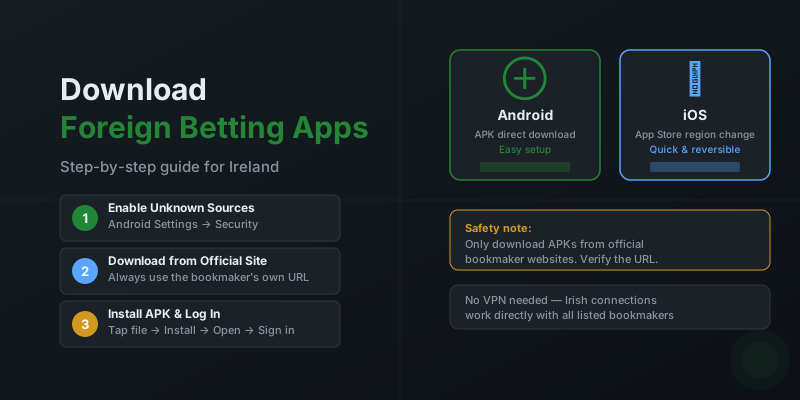
Many international bookmakers are not listed on the Irish Google Play Store or the Irish Apple App Store, even though they are completely legal to use from Ireland. This is purely a result of app store regional restrictions on gambling content — not any legal prohibition. This guide explains exactly how to download foreign betting apps on both Android and iOS devices from Ireland.
Downloading on Android
Android is the more straightforward platform for downloading international betting apps. Because Android allows installation of apps from outside the Play Store (called "sideloading"), bookmakers make their official APK files available directly on their websites.
Step-by-Step: Installing a Betting APK on Android
- Enable Unknown Sources: Go to Settings > Security (or Privacy on newer Android versions) and enable "Install from Unknown Sources" or "Install Unknown Apps". On Android 8 and later, you grant this permission per-app (e.g., for your browser) rather than globally.
- Visit the bookmaker's website: Navigate to the bookmaker's official site on your Android browser. Look for an "Android" or "Mobile App" link, typically in the footer or a banner at the top. Verify you are on the correct official domain.
- Download the APK: Tap the download button. Your browser will download the APK file. You may see a warning — tap "OK" or "Download Anyway" to proceed. The file goes to your Downloads folder.
- Install the app: Open the Downloads folder (or the notification shade) and tap the APK file. Follow the on-screen installation prompts.
- Open and log in: Once installed, the app appears in your app drawer. Open it, log in with your existing account or register if you are a new customer.
Android Download Safety Checklist
- Always download from the bookmaker's official website — not third-party APK sites
- Double-check the URL before downloading (look for HTTPS and the correct domain)
- Re-disable "Unknown Sources" after installing if you want to restore default security settings
- Keep the app updated by revisiting the bookmaker's site when updates are available
Downloading on iOS (iPhone and iPad)
Apple's App Store is more restrictive than Google Play when it comes to gambling apps. Some foreign bookmakers do have apps listed on the Irish App Store. For those that don't, the most reliable method is to temporarily change your Apple ID's country/region to access another region's store.
Method 1: Check the Irish App Store First
Search for the bookmaker's name on the Irish App Store. If the app is listed, download it normally. Betlabel, 20bet, and 22bet maintain App Store listings accessible from Ireland.
Method 2: Change App Store Region
- Sign out of iCloud (optional but cleaner): You can change region without signing out, but having no active subscriptions makes the process simpler.
- Go to Settings: Tap your name at the top of Settings, then tap "Media & Purchases" > "View Account" > "Country/Region".
- Select a new region: Choose a region where the app is available — Malta and the United Kingdom are good options for most betting apps. Tap "Change Country or Region".
- Payment method: Select "None" as your payment method if you do not have a card for that region, or enter valid payment details. Agree to terms and conditions.
- Download the app: Open the App Store, search for the bookmaker, and download the app.
- Switch back: Return to Settings and change your region back to Ireland. Downloaded apps remain installed and continue to receive updates.
Setup and Account Access
Once the app is installed, the experience is straightforward. If you already have an account with the bookmaker, simply log in with your existing credentials. If you are new, you can register directly in the app — the process is identical to the website registration.
Most foreign bookmaker apps support biometric login (fingerprint and Face ID) from the first login. Enable this in the app settings for faster access. Push notifications for odds boosts and results can be configured in the app's notification settings.
Related Pages
- Best mobile betting apps from foreign bookmakers — full comparison
- Mobile betting features comparison — what to look for
- Live streaming on mobile — which sites stream live events
- Betting guides for Irish players — full guide library
Frequently Asked Questions
Why can't I find foreign betting apps on the App Store?
Google Play and the Apple App Store restrict gambling apps by region. Many international bookmakers are not listed on the Irish storefront even though they are perfectly legal to use. The solution is either to change your App Store region temporarily (iOS) or download an Android APK directly from the bookmaker's website.
Is it safe to download a betting APK?
APK files downloaded directly from a licensed bookmaker's official website are safe. The risk comes from third-party APK distribution sites. Always navigate to the bookmaker's own site and download from their official download page. Verify the URL is correct before downloading.
How do I change my App Store region to download foreign betting apps?
On iPhone, go to Settings > [Your Name] > Media & Purchases > View Account > Country/Region. Select a region where the app is listed (e.g., Malta or UK). You will need a valid payment method or gift card for that region, or use None as the payment option. After downloading, you can switch back to the Irish region.
Do I need a VPN to use foreign betting apps in Ireland?
No. Foreign betting apps that accept Irish players do not require a VPN. Using a VPN can actually cause problems — some bookmakers flag VPN connections as suspicious and may limit account functionality. Use the apps on your normal Irish internet connection.