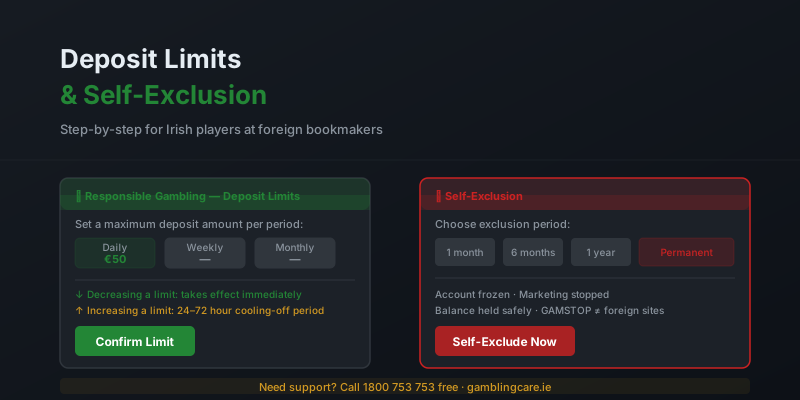
Setting responsible gambling limits is one of the most effective ways to maintain control of your betting. At foreign bookmakers accessible to Irish players, these tools are available in your account settings. This guide walks through the exact steps to set deposit limits, loss limits, and request self-exclusion — and explains what happens after each action is taken.
Setting Deposit and Loss Limits
Where to Find the Limits Section
At every MGA-licensed bookmaker, responsible gambling tools are accessible from your account. The section is typically labelled one of the following:
- Responsible Gambling
- Player Protection
- My Limits
- Account Settings > Limits
A shortcut to the responsible gambling section is usually available in the site footer and sometimes in the account dropdown at the top of the page. If you cannot find it, use the live chat and ask customer support to navigate you there directly.
Step-by-Step: Setting a Deposit Limit
- Log in to your bookmaker account.
- Navigate to your account settings or the responsible gambling section.
- Select "Deposit Limits" or "Funding Limits".
- Choose your preferred period: daily, weekly, or monthly.
- Enter the maximum deposit amount for that period.
- Confirm the limit. It takes effect immediately.
Step-by-Step: Setting a Loss Limit
- Navigate to the same responsible gambling or limits section.
- Select "Loss Limits" or "Net Loss Limits".
- Choose daily, weekly, or monthly.
- Enter the maximum net loss permitted in that period.
- Confirm. The limit takes effect immediately.
Setting Limits: Best Practice
- Set limits when you first open an account — before your first deposit
- Use monthly limits as the primary safeguard; daily limits for additional control
- Set limits based on what you can afford to lose entirely, not on expected returns
- Review limits periodically as your financial situation changes
- Use the session time limit feature alongside financial limits for comprehensive protection
How to Self-Exclude
Self-exclusion closes your betting account for a period you choose. It is a more serious measure than deposit limits and is appropriate if you feel you are losing control of your gambling. Once initiated, you cannot place bets, make deposits, or receive promotional emails during the exclusion period.
Step-by-Step: Requesting Self-Exclusion
- Log in to your account and navigate to the Responsible Gambling section.
- Select "Self-Exclusion" or "Close Account" (phrasing varies by bookmaker).
- Choose your exclusion period: typically 1 month, 3 months, 6 months, 1 year, or permanent.
- Confirm your decision. Some bookmakers require you to contact live chat or email to complete the request as an additional deliberate step.
- You will receive an email confirmation. Your account is immediately suspended.
GAMSTOP note: GAMSTOP is the UK self-exclusion register and only applies to UKGC-licensed bookmakers. Foreign bookmakers listed on AbroadOdds are not covered by GAMSTOP. Self-exclusion at foreign bookmakers must be done individually at each site. The Irish national self-exclusion register (introduced under the Gambling Regulation Act 2024) is being developed and will apply to domestically licensed operators.
After Self-Exclusion
Once self-excluded, your account balance is not forfeited. Any remaining balance is held by the bookmaker. When a temporary exclusion expires, you can contact the bookmaker to request reinstatement — this typically involves a 24-hour mandatory reflection period before the account is reactivated. Most bookmakers will not proactively contact you when your exclusion expires to encourage you to return.
If you self-excluded because of a problem with gambling, please consider contacting a support organisation rather than reinstating your account immediately. See the resources below.
Related Pages
- How to verify a foreign betting site is safe — full safety guide
- Responsible gambling tools at foreign sites — overview of all tools
- Gambling licences explained — MGA, UKGC, Curaçao
Frequently Asked Questions
Can I self-exclude from foreign betting sites?
Yes. All MGA-licensed bookmakers offer self-exclusion. You can request exclusion through your account settings or by contacting customer support. Self-exclusion typically covers the specific bookmaker only — it does not automatically apply across other sites. You need to self-exclude from each bookmaker individually.
Does GAMSTOP work on foreign bookmakers?
No. GAMSTOP is a UK self-exclusion scheme that only covers UKGC-licensed bookmakers. Foreign bookmakers licensed by the MGA or Curaçao are not part of the GAMSTOP scheme. Irish players need to self-exclude directly at each foreign bookmaker, or use the Irish national self-exclusion register once it is fully operational under the Gambling Regulation Act 2024.
How do I set a deposit limit?
Log in to your bookmaker account and navigate to Account Settings or the Responsible Gambling section (usually labelled Player Protection or My Limits). Select Deposit Limits, choose a daily, weekly, or monthly limit, enter the amount, and confirm. Limits take effect immediately when you lower them. Limit increases require a waiting period.
Can I reverse a self-exclusion?
Temporary self-exclusions automatically expire at the end of the chosen period — you then have to actively request account reactivation, which typically includes a 24-hour reflection period. Permanent self-exclusion cannot be reversed. It is irreversible and the account is closed permanently.
Sources and support organisations: